Articles

I keep losing my cursor

I work for myself alone at home mostly… the dear husband (DH) is also here. So my schedule and life are not much different since the social distancing started.

But already I’m bored.. AND I learned this cool thing, which I’m sharing now.

How to change the size and color of your cursor (on a PC)

Mac link is here

(A picture of which I can NOT include in a screen shot.. because all the captures block that out.. but here you go.)

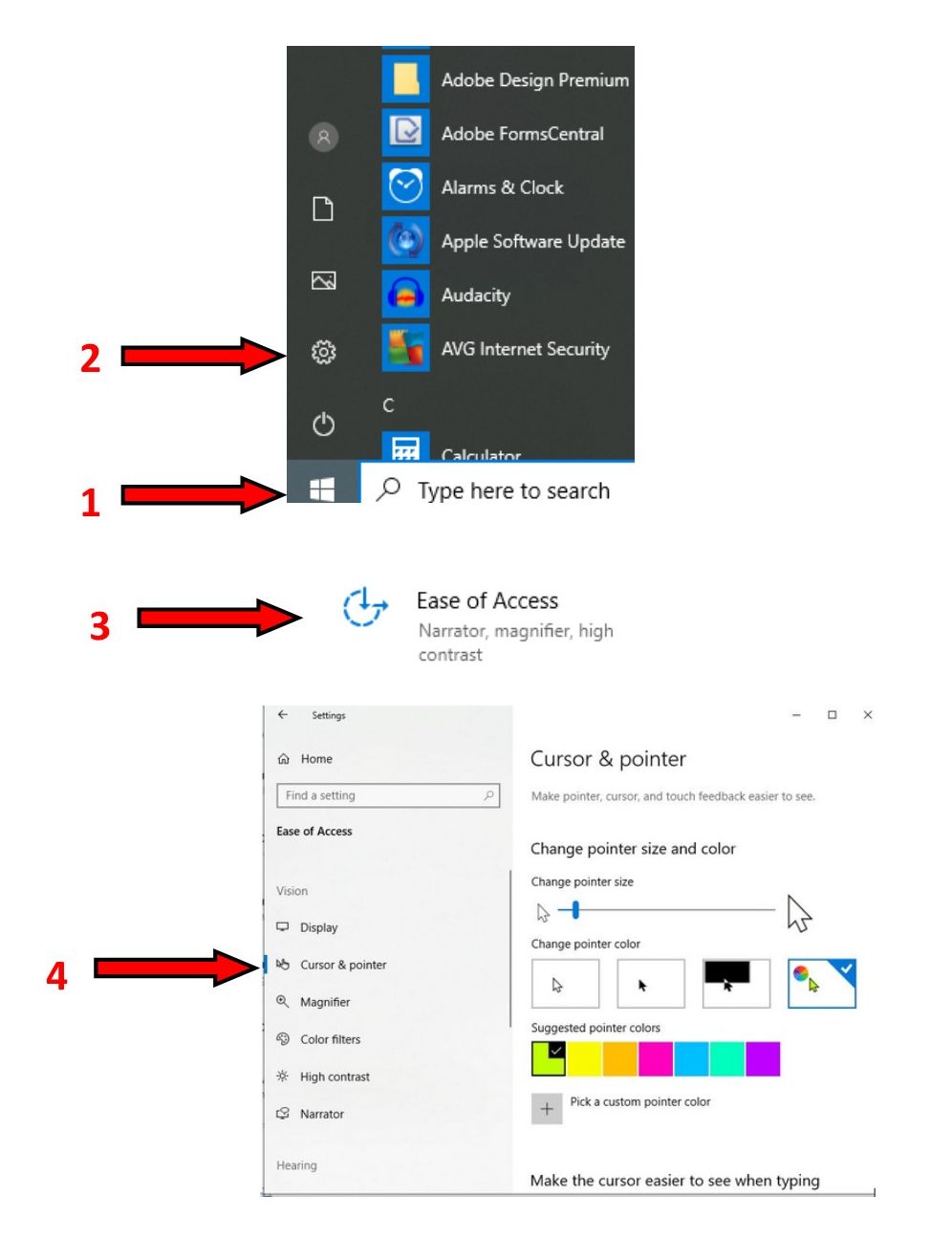
  1. Go to Start button in the lower left corner of your screen
  2. Then click the gear (Settings)
  3. Choose Ease of Access (you might have to scroll down a bit)
  4. Then choose Cursor & Pointer to adjust the size of the pointer and the color!

Mine is now bright green and slightly larger.. so I can find it on any one of my three screens!

And because I was bored, I made this image.

What will happen if I click that button?

When people know what will happen next, they are more likely to go along for the ride.

I don’t like to get in a car and randomly drive. I don’t necessarily need to know exactly where I’m going: it could just be “let’s see what’s up this road.”

When people know what will happen next, they are more likely to go along for the ride.

I don’t like to get in a car and randomly drive. I don’t necessarily need to know exactly where I’m going: it could just be “let’s see what’s up this road.”

But if you’re giving me directions, you better tell me where the end point is.
If all I have is “turn right here, then turn left there” I’ll have a very hard time following along. It’s just the way my brain works.

It’s similar with Call to Action buttons.

I want to know what will happen if I click.

  • Will my credit card be automatically charged?
  • Do I have another chance to review my order?
  • Will this link open in a new tab?
  • Will it download a PDF or a Word document?

CTA a single command, an action word.

Click this and that will happen.
Tell me what I’ll get for sharing my contact information.

  1. Write a title/tag line in big letters: What is the purpose of the button?
  2. Then show the button — which should be big and obvious and in a color used specifically for buttons.
  3. And then a short explanation of what will happen next, or what you’ll get if you click the button.

Check out this great article and infographic at DigitalInformationWorld.com about using CTAs.

Want help figuring out your best Call to Action

Head over to my contact page…
even if you’re not sure what your questions are.

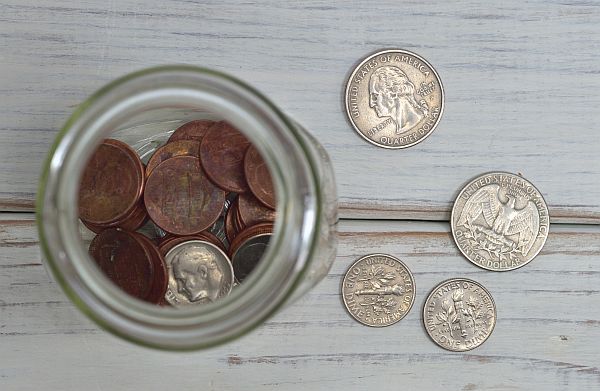
Get rich from ads on your site? NOT!

Maybe, if you’re lucky,
you’ll get pocket change

A lot of people talk about starting a blog and making millions from ads.

But think about those click bait stories on Facebook. How long do you wait for the ads to load before you see what that celebrity looked like at 10 years old… and then, who really cares enough to wait?

The short answer to the question about ads on your site, as my friend Mickey says, is:

It makes a website:
look cheap
get off the target of the page and
can send visitors away from the site.

Yet, I went looking for more information and found 13 Reasons Why Blog Ads Suck for Monetizing Your Site (And What to Do Instead) by Sarah Peterson over at SmartBlogger.com

Instead, Sarah says, essentially, you gotta sell something: Something you make, you do, or something that somebody else makes or does that you can get paid for. She has some suggestions.  But you gotta think about that part probably really early in your plan to be the next millionaire!

Photo by Miguel Á. Padriñán from Pexels 

Why are my links not working?

You think you have links to other sites set appropriately.
But they keep showing 404 errors when visitors click on them.
Here’s why.

You think you have links to other sites set appropriately.
But they keep showing 404 errors when visitors click on them.
Here’s why.

Line 1. Internal links can be relational

Line 2. But external links must include the full URL
including the https:// part

Line 3. cnn.com won’t get you where you want to go

Check the code below:

what the code looks like for these links

  • The link on Line 1 (above) is to another page on this site. So I only need the part of the address as it RELATES to this site.
  • The link in Line 2 is to CNN.com is correctly coded because it includes the full address: http://cnn.com
  • The link in Line 3 is to CNN.com is NOT correctly coded because WordPress interprets it as a relative link and, therefore, it is automatically prepended with https://wefixbrokenwebsites.com/ (oh that cnn were part of my website!)
    cnn.com (Line 3 without the full URL) lands you on a 404 page here instead of at CNN.com

WordPress upgrade to 5.0 due December 6

In the big picture of life, you MUST upgrade to WP 5.0. Future security and bug fixes will depend on your having the latest version of the program.

Newest version of WordPress will come out on Thursday.
YES, THIS WEEK. December 6, 2018

That means the Gutenberg content editor will be installed with WordPress 5.0.
In the big picture of life, you MUST upgrade to WP 5.0. Future security and bug fixes will depend on your having the latest version of the program.

But update now? I say not Yet!

I’m going to side with YOAST about the need to update. NOT YET!
gutenberg text editorI’d wait until at least January to update your WordPress core files (that is, to take the update).

With any new release there are bugs that get cleaned up pretty quickly. So there’s no need to rush.

This is a very busy season for many people. If not religious holidays then, at least, year-end business activities. No reason to add to the headache needlessly.

Then what? Test everything

Additionally, and perhaps most importantly, ALL YOUR PLUGINS must be checked to see if they are compatible with Gutenberg, the new content editing screen.

Testing should be done on a staging site. (That’s a mirror of your site, but not at your URL address). It could be done on a local environment (That’s the whole website loaded and running on a computer but not on the internet). You don’t want to do it on your live site in case something breaks.

Look, maybe nothing will happen. If you aren’t using any fancy code in CONTENT, you’re probably going to be ok.  But, if you’re using any plugins that use short codes, or put widgets on pages, I just don’t know.

It’s my understanding that if you don’t ever open existing content once Gutenberg is loaded, no bad things will happen. But how can you be sure about that? (And there is a good chance that I dreamed that!  So don’t trust its voracity.)

This will not affect your theme! Just the way you write your content.

If you want to get a leg up on what Gutenberg looks like and how it works, there is an excellent course by my friend Joe Cassabona over at CreaterCourses.com  Introduction to Gutenberg and WordPress 5.0 (And yes, I get a small fee for recommending it! AND it’s worth it anyway!)
Today (12/4/2018) it’s only $24.

Options

If you must go a head with the upgrade before you’ve tested and backed up everything, here are two suggestions for plugins that may help you maintain the status quo.

  •  Classic Editor Plugin that should work to maintain your current process.
  • Gutenberg Ramp  that allows you to set Gutenberg to run on only pages or only posts or specific post types (although being too granular probably requires a bit of coding.)

Both those plugins are available in the WordPress Repository, the safest place to get your plugins.
WordCamp Baltimore 2018 Beginner Track

Session slides from Baltimore WordCamp 2018

Session 1: WordPress Definitions from WordCamp Baltimore 2018

Session 2: Tour through the Admin Sidebar (see below)

Session 3: Gutenberg The new WordPress Editor (Eileen Violini)

Session: 4 Launching your very first WordPress website
Covers the basics of security and optimizing your WordPress website for the search engine. (Neha Gupta Goyal)

Session 5: Adding and Managing Your Images in WordPress
(or How Come This Doesn’t Look Right?) (Kim White)

Session 6: Plugins and Widgets, Oh My! (see below)


Session 2: Tour through the Admin Sidebar


Session 6: Plugins and Widgets, Oh My!

WordPress for Novices:
10ish Tips to Make WordPress Your Friend
Lehigh Valley WordCamp 2018

This is an updated version of my talk “Make WordPress Your Friend!”
Hope you learn stuff. I’d hate it if it weren’t useful.

This is an updated version of my talk “Make WordPress Your Friend!”
Hope you learn stuff. I’d hate it if it weren’t useful.

Also.. I mentioned a plugin for making notes on your plugin list:: Plugin Notes Plus

Gutenberg vs Classic Editor

gutenberg text editorContent Editing in WordPress:
Now and …INTO the FUTURE

Comparing the existing (now called Classic) editor with the soon to be released Gutenberg editor
WordCamp Lehigh Valley WordCamp 2018

There are lots of differences. Existing users will have to learn the changes. New users seem to like it as it is.

Thanks to all the participants in Carlisle who helped me get clear on several details of the talk.

[slideshare id=110592030&doc=comparingwithgutenberglvpa2018-180819213547]

Searching for SEO: At least 7 places to look for help

There is an overwhelming amount of content to study when you’re trying to understand SEO (Search Engine Optimization)

These are my top 7 places to look for advice as presented in my talk to WordCamp Lancaster 2018

Slides from the talk follow

  1. Yoast.com
    Yoast’s plugin is pretty much the definitive set up for SEO in WordPress. The website’s blog has several hundred articles on everything from SEO basics to really Technical info.  And even if you don’t use the WordPress plugin, or even have a WordPress site, the information there is solid.
  2. backlinko.com/keyword-research
    There’s a great downloadable PDF of the whole article or you can just read through the content by chapters. The content includes information on  long tail keywords, and SEO Content
  3. moz.com/explorer/
    Moz.com used to be SEOmoz way back in the dark ages of the internet. The site has several free SEO tools.  Probably the easiest is the Keyword Explorer.  Some of the tools are free and some have 30 day trials.
  4. wordtracker.com  has a 7 day free trial. After that, it’s not cheap.  But if you’re starting out, looking for some general direction, it’s worth the 7 days of research
  5. boardreader.com Is “just” a search engine for message boards and forums.  The SEO tie-in here is to find words that people use to talk about your topic.  Then you can use this collection of words to search thru moz explorer or wordtracker links above
  6. wikipedia.com Wikipeida is another place to look for related terms  on a given topic.  Use the table of contents block on your topic or scan the article for other ideas on your topic
  7. answerthepublic.com  This is my favorite.
    Ask a question and the sour looking old man will give you a chart of about 50 topics relating to your question. Plus, it’s fun!

Also read:

How Little Do Users Read?  Based on more than 45,000 page views:  On the average Web page, users have time to read at most 28% of the words during an average visit. But 20% is more likely.

Did readers actually read a story about reading?  From the Washington Post:  25% of people don’t read past the title

Here are a couple of other articles I’ve written about SEO

Easy SEO: A Brilliant Article

5 Easy Things You Can Do To Get Better Search Engine Ranking

How can I get to Number One on Google?